Skip to content

Battle Dialogue

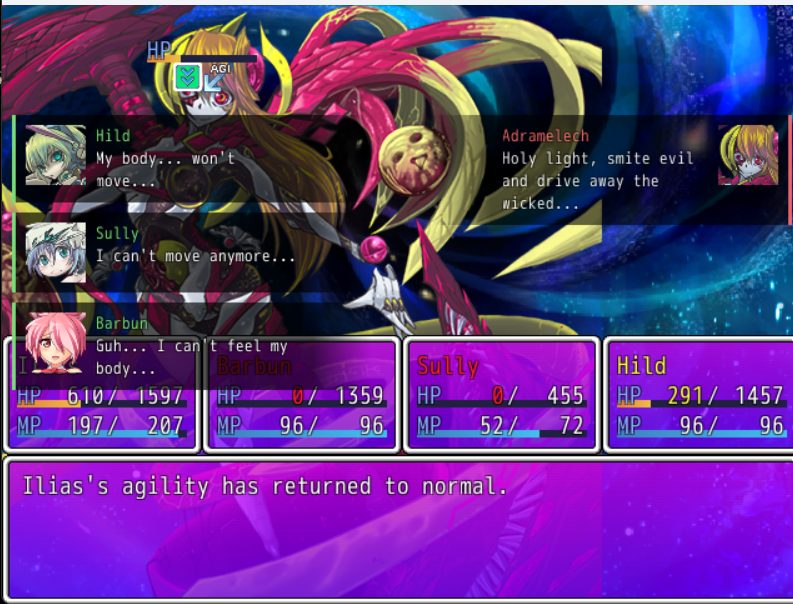
Shows the dialogue in battles to the sides rather than in the message box.

by Paulinchen 1 downloadslatest 1.5.0 Linked to GitHub Pauliinchen/MGQ-Paradox-Mod-Collection (opens in a new tab)

Description from the GitHub README

Battle Dialogue

Shows what is said in a battle in boxes that slide out at the sides of the screen, in the same style as Map Display (opens in a new tab), instead of the message window. The battle no longer stops until you press a key: animations and damage go on while the lines are shown.

  • Lines of your party slide out at the left with a green bar, lines of the enemy side at the right with a red bar, each with the speaker's face and name. The box fades out towards the middle of the screen.
  • A summon speaks on the side of whoever summoned it.
  • Lines of the game's events, such as an enemy's answers when you use Talk, show at the right unless a member of your party says them.
  • Messages nobody says, such as "... appears!", show as a see-through strip at the top, below the skill name.
  • Each box stays for 1.5 to 5 seconds, depending on how long the line is, then fades out. Up to three stack on each side, the newest on top.
  • Messages with choices stay in the normal message window.
  • Once a battle is won or lost, its messages stay in the normal message window too, so victory screens such as Victory_Screen.rb wait for you as before.

It works together with Monster Girl Quest! Online (opens in a new tab).

Install

  1. Install the community's mod loader: the Patch.rb from Patch.rb (enable Type 1 mods) (opens in a new tab) on the MGQ wiki, in your Patch folder. If you already use other Patch folder mods, you have it.
  2. Download Battle_Dialogue.rb (opens in a new tab) and put it into the Patch folder.

To uninstall, delete Patch\Battle_Dialogue.rb.

Settings

Timing, sizes, positions and colors are constants at the top of Battle_Dialogue.rb. Open it in any text editor to change them. ENABLED = false turns the boxes off without uninstalling the mod.

Compatibility

Tested on 3.06, with and without the English translation.

This mod wraps the following methods and calls the original from them:

  • Scene_Battle#wait_for_message
  • Scene_Battle#process_skill_word
  • Scene_Battle#process_down_word
  • Scene_Battle#update_basic
  • Scene_Battle#terminate
  • Game_Message#clear

Mods that replace these without calling the original may not work together with it.

A mod that shows battle messages of its own can name who says one by setting $game_message.speaker to that battler; the box then shows on that battler's side. Without it, the side is told by the speaker's name and face.

Versions

Version 1.5.0

Latest

19 KB 1 downloads From GitHub release v1.5.0 scanned clean 1 d ago

What changed

A new mod, Invasions, and options a mod keeps in every save for Mod Config Remake.

Invasions (new)

More monsters of the area join your battles while you fight them.

  • After each turn there is a small chance that another group of the monsters you could meet where you stand joins the battle: a flashing red WARNING with caution tape and the game's alarm, then the monsters fade in and act in the very next turn.
  • While any of them stands, you cannot flee.
  • Random encounters you can flee from get invasions, and so do story boss fights, optional ones included. Other story and event battles, Library replays and battles during time stop never do.
  • At most 8 monsters stand in a battle at once; the new ones count for EXP, gold, drops, the monster library and recruiting.
  • Options in the Mod Config: Invasion Chance (Off to 100%, 5% by default), Invasions per Battle (1 to 5, 2 by default) and In Boss Battles (On by default).

Mod Config Remake

  • For mod authors: an option marked :mod_stored reads its value from the mod's :value proc and leaves keeping it to its :on_change, so a mod can keep an option in a file of its own that holds in every save. Monster Girl Quest! Online 0.6.0 uses it for its interface look and positions. See the README's For mod authors.

Fixes and docs

  • The READMEs call bindable keys hotkeys throughout, and Party Sheet's README names Mod Config Remake like the others.

Install or update

Download the mods you want and put each into the Patch folder, replacing the old files: Invasions.rb is new, and 0_ModConfigRemake.rb changed. The other mods are unchanged since 1.4.2.

Files and hashes (1)

Package: Battle_Dialogue.rb SHA-256 of the package fb54d178f6130ddf628a59b6b229da56834575efd09284eb58e5cf3be9e77310

File Size SHA-256
Battle_Dialogue.rb 19 KB fb54d178f6130ddf628a59b6b229da56834575efd09284eb58e5cf3be9e77310
Something went wrong. Reload

Connection interrupted

Your session is still open. The site keeps trying to restore it.

Rejoining the server…

Rejoining failed. Trying again in seconds.

Could not rejoin. Retry now or reload the page.

The server has paused the session.

Could not resume the session. Retry now or reload the page.