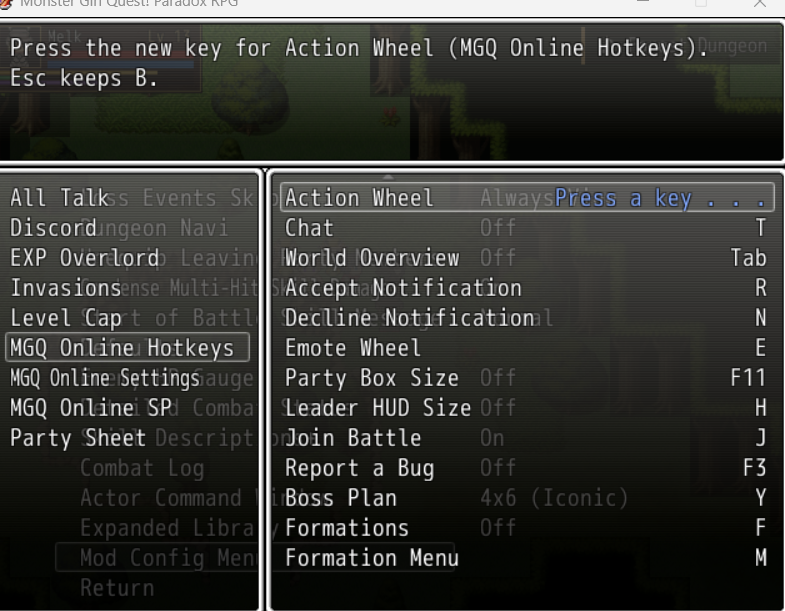
Mod Config Remake
A menu for the options of your other mods, which replaces the Mod Config Menu. Mods made for the Mod Config Menu work with it as they are.
- It lists your mods at the left, such as Discord or EXP Overlord, and shows the options of the one you point at at the right. Confirm moves into its options, Cancel goes back to the list, and Cancel in the list closes the menu.
- Options that belong to no mod in particular are listed under Global, which only shows when there are any.
- With newer versions of the English translation, whose options screen has tabs, the menu is the Mods tab. The original Mod Config Menu no longer opens there.
- With older versions, and in the untranslated Japanese game, the Mod Config Menu entry in the options opens it.
- Left and right change an option, Confirm moves it to its next value or presses a button.
- A key binding shows its key. Confirm it, then press the new key; Esc keeps the old one. Keys the game uses itself (Enter, Space, Esc, Z, X, Shift, Ctrl, A, S, D, Q, W, Page Up, Page Down, the arrows, Num 0, 2, 4, 6 and 8, F1, F2, F5 to F9 and F12; see Keys the menu refuses) and keys another option has already are refused.
- Options and buttons a mod greys out cannot be used until it allows them again.
- In a multiplayer world that sets your mods' options for everyone, such as one of Monster Girl Quest! Online (opens in a new tab), those options are greyed out while you play in it, and their help says they are set by the world. Key bindings stay yours.
Install
- Install the community's mod loader: the
Patch.rb from Patch.rb (enable Type 1 mods) (opens in a new tab) on the MGQ wiki, in your Patch folder. If you already use other Patch folder mods, you have it.
- Download
0_ModConfigRemake.rb (opens in a new tab) and put it into the Patch folder.
It takes the place of the Mod Config Menu, so Patch\0_ModConfigMenu.rb can stay or go. Your mods keep their settings, since both menus store them the same way.
To uninstall, delete Patch\0_ModConfigRemake.rb.
For mod authors
Add your options the way the Mod Config Menu expects them: insert an entry before the last one of NWConst::Config::MOD_CONTENTS (or NWConst::Config.mod_target), and fill DATA, DATA_TEXT and DEFAULT for its key. An entry understands:
| Key |
Meaning |
:key |
The option's key in $game_system.conf, :mod_ first. |
:name |
Its name in the menu, a text or a proc. Start the first option of your mod with [Mod Name] , which names your mod in the list and is left out of the names shown. Indent the options that follow it, " Option" or " -> Option", so they stay under your mod. An option with neither goes to Global. |
:help |
Its help, a text or a proc. The value's help from DATA_TEXT follows it. |
:sub |
true for an option with values, false for a button, which calls the handler of its key on the menu's window, Window_ModConfig. |
:values |
Its values, an array or a proc, in place of DATA. |
:enable |
A proc; while it returns false, the option is greyed out and cannot be changed. |
:on_change |
A proc called with the new value after each change. |
:keybind |
true for a key binding: its value is a key's Windows code, such as 0x54 for T, which the menu shows by its name and replaces with the next key the player presses. It needs no DATA. Leave :sub out. |
:personal |
true for an option that stays each player's own when a multiplayer world sets the options of your mod, such as a colour or a window's place. Key bindings always do. |
:value |
For a key binding, or an option marked :mod_stored: a proc that reads its value, in place of $game_system.conf, which the game keeps in each save. With it, the menu stores nothing itself: keep the value from :on_change, such as in a file of your mod, so it holds in every save. |
:mod_stored |
true for an option with values that your mod keeps itself: the menu reads it with :value and only calls :on_change. Check ModConfigRemake.respond_to?(:mod_stored?) before adding one, since older menus store every option in the save. |
Scene_Config#refresh_mod_config draws the options again, as in the Mod Config Menu; call it when one of your options changes how others show.
The menu's window shows one mod's options at a time, so in Window_ModConfig an index counts that mod's rows, not the entries of MOD_CONTENTS: use entry(index) or key(index) to find a row's entry. An error in your :on_change proc or a button's handler leaves the menu running.
A key binding
Key bindings came with 1.3.0. Older versions of this menu and the Mod Config Menu show them as buttons that do nothing, so add one only while ModConfigRemake::Keys is defined, and keep your default key otherwise. ModConfigRemake::Keys.name(code) names a key as the menu does.
module NWConst::Config
  # Only Mod Config Remake 1.3.0 or later knows key bindings; older menus keep the default key.
  if defined?(ModConfigRemake::Keys)
    MOD_CONTENTS.insert(-2, {
      :key     => :mod_my_mod_hotkey,
      :name    => "[My Mod] Hotkey",
      :help    => "The key that opens My Mod's window.",
      :keybind => true,
    })
  end

  # M, a key the game leaves free.
  DEFAULT[:mod_my_mod_hotkey] = 0x4D
end

module MyMod
  # Windows' function that tells whether a key is down.
  KEY_STATE = Win32API.new('user32', 'GetAsyncKeyState', 'i', 'i')

  # Reads the key the player bound, the default until they bind another.
  def self.hotkey
    ($game_system.conf[:mod_my_mod_hotkey] rescue nil) || NWConst::Config::DEFAULT[:mod_my_mod_hotkey]
  end

  # Reports whether the key went down since the last call. Call it once per frame.
  def self.hotkey_pressed?
    down = (KEY_STATE.call(hotkey) & 0x8000) != 0
    pressed = down && !@down
    @down = down
    pressed
  end
end
- The value is the key's Windows code. The menu shows its name and adds "Confirm, then press the new key." to your help, so don't write that yourself.
- The default comes from
DEFAULT, as for any option. Set it even when the key binding isn't added, so older menus keep it. Pick a key the game leaves free: the menu refuses the keys below and keys another option already has when a player binds one, but it doesn't check your default.
- Reading the hotkey is up to your mod; the menu only stores its code.
GetAsyncKeyState reports a key whichever window is in front, so check that the game is in front if that matters.
- One hotkey for every save: the game keeps
$game_system.conf in each save, so a hotkey bound here holds only in the save it was bound in. To keep it in every save, store it yourself: add :value => proc { MyMod.hotkey } and :on_change => proc { |code| MyMod.store_hotkey(code) }, and read and write the hotkey in a file of your mod.
- Esc keeps the old key and doesn't call
:on_change. :enable greys a key binding out like any other option. Key bindings take keyboard keys only, not gamepad buttons.
The game uses these itself, as RGSS lays out the keyboard by default. A player who changed the keys in the game's F1 settings still gets this list.
| Keys |
Windows codes |
What the game does with them |
| Enter, Space, Z |
0x0D, 0x20, 0x5A |
Confirm |
| Esc, X, Num 0 |
0x1B, 0x58, 0x60 |
Cancel; Esc also keeps the old key while the menu waits for one |
| Left Shift, Right Shift |
0xA0, 0xA1 |
Dash |
| A, S, D |
0x41, 0x53, 0x44 |
The X, Y and Z buttons |
| Q, W, Page Up, Page Down |
0x51, 0x57, 0x21, 0x22 |
The L and R buttons |
| Left, Up, Right, Down |
0x25 to 0x28 |
Move |
| Num 2, Num 4, Num 6, Num 8 |
0x62, 0x64, 0x66, 0x68 |
Move |
| Left Ctrl, Right Ctrl |
0xA2, 0xA3 |
Skip messages |
| F1, F2, F12 |
0x70, 0x71, 0x7B |
RGSS: the key settings, the frame rate, reset |
| F5 to F9 |
0x74 to 0x78 |
The game's own keys, such as F8, which hides the message window |
A binding never takes the mouse buttons, the Windows keys (they leave the game), Shift, Ctrl and Alt without a side (Windows reports the left or right one), or media, browser and input method keys. These keys work: letters, digits, the other F keys up to F24, the other number pad keys, Tab, Backspace, Caps Lock, Pause, Insert, Delete, Home, End, Print Screen, Menu, Num Lock, Scroll Lock, Left Alt, Right Alt, and the keys with punctuation, which show the character your keyboard prints on them.
Compatibility
Tested on 3.06 with the English translation, with and without its tabbed options screen, and on the untranslated 3.06. Its own texts are in English.
This mod wraps the following methods and calls the original from them:
Scene_Config#start (without 0_ModConfigMenu.rb)Scene_Config#create_config_window (options screen without tabs, without 0_ModConfigMenu.rb)Scene_Config#on_config_tab_ok (tabbed options screen)SceneManager.run
Mods that replace these without calling the original may not work together with it.
It defines the following anew, replacing those of 0_ModConfigMenu.rb when that is installed:
Window_ModConfig, the whole classScene_Config#create_mod_config_windowScene_Config#start_mod_configScene_Config#refresh_mod_configScene_Config#end_mod_config
Mods that hook these methods of 0_ModConfigMenu.rb or keep its window class get this mod's instead.