Party Sheet
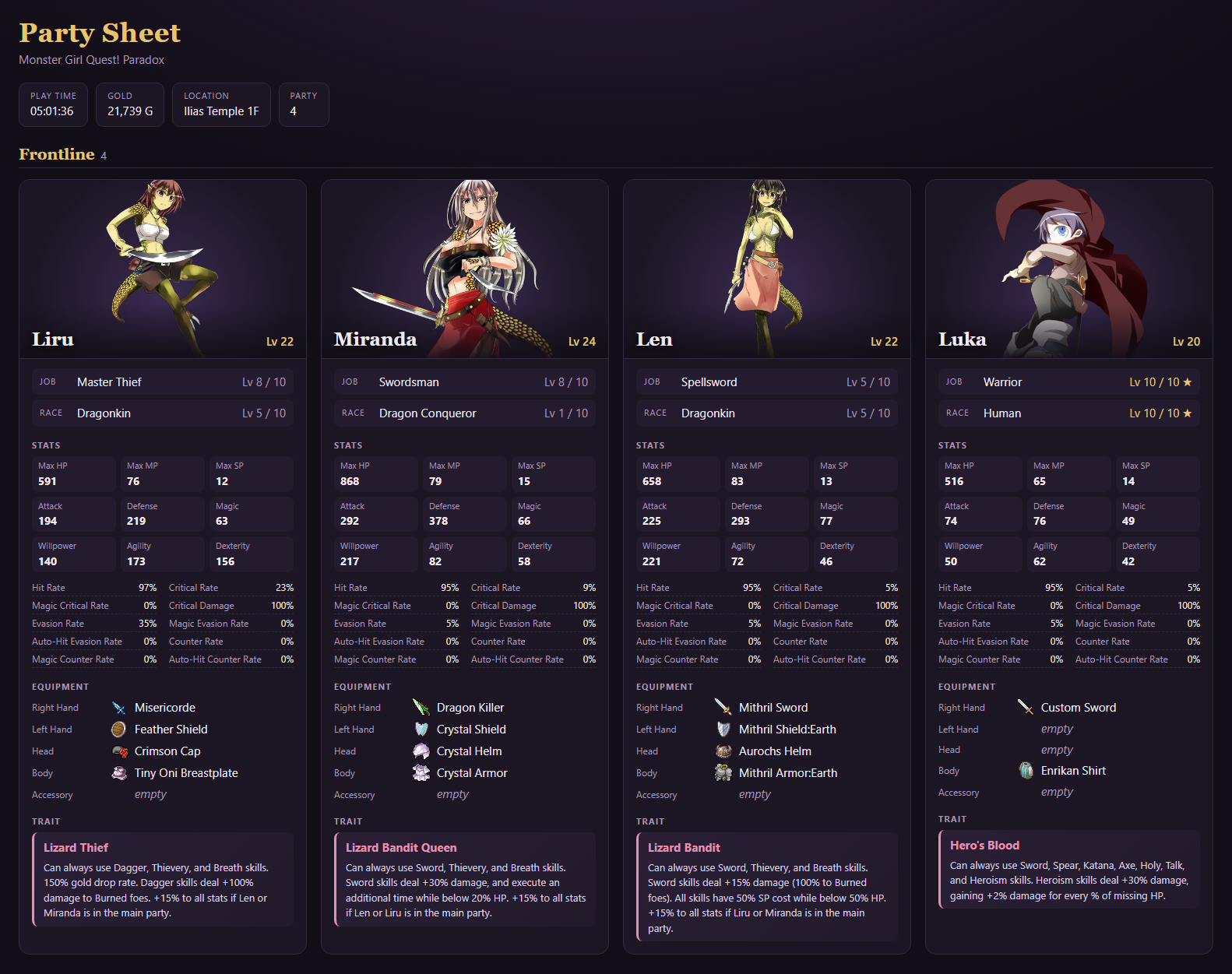
Press P anywhere in the game to write a party sheet into the Party sheets folder of the game folder: a card for every party member, split into the Frontline and the Reserve, with play time, gold and location on top. Open it in any browser.
Each save gets its own sheet, named after the save you last loaded or saved to: 05_party_sheet.html for save 5, autosave01_party_sheet.html after loading the autosave, unsaved_party_sheet.html for a new game you haven't saved yet. Writing the sheet again replaces that save's sheet.

On each card
- Picture from the Library, with name and level.
- Job and race with their levels; a star marks a mastered one.
- Stats, Max HP, MP and SP included, with large numbers shortened the way the game's status screen does, like
12.346Mil.. Hover a stat for its exact value.
- Equipment, with the icons of the gems in each item's sockets next to its name.
- Abilities equipped, per category in the colours of their icons in the ability screen, with the AP they use. Proof Abilities show up once you have them.
- Trait with its description.
Hover an item, gem or ability for the game's description of it.
Longer lists fold away and open with a click:
- the effects of each item, and its gems with their effects
- each ability category
- Applied Effects: the resists, usable skill types, effects and boosts everything on the character adds up to.
- The resists are every list the game's status screen shows, under its names there, so a list another mod adds to that screen shows up too.
- Effects and boosts are sorted into categories like Strikes, SP, Defense or Element, the largest amount first, then by name. Effects from several sources are combined the way the game combines them in battle (added up, multiplied, the highest counting, or chances combined) and marked with ∑; hover them for the calculation.
- HP, MP and SP costs show what skills really cost: the rate every skill costs, and the skill types and skills that cost more or less, each worked out the way the game prices them.
- Chains list the free follow-up actions the character gets, like Dagger → Throwing → Ninjutsu, with the damage and cost of chained skills.
- the jobs and races mastered, sorted by rank like the job change screen, from Basic to Forbidden
The images are inside the page, so it can be moved or shared on its own. A few seconds after writing it, Edge or Chrome converts the portraits to WebP in the background, which takes the page from about 8 MB to about 2 MB for a full party.
Frontline image
P also writes an image next to the page, like 05_party_sheet.png: the Frontline's cards side by side, without the folded lists. It fits Discord well, where images show right in the chat.
The image is taken by Microsoft Edge, or Google Chrome if Edge is missing, which runs in the background without a window. The game doesn't wait for it; the image appears a few seconds later.
Character image
Press P while a character's status screen is open to write an image of that character alone, like 05_party_sheet_Alice.png next to the other files. It holds everything the page shows of her, with no lists folded away:
- her picture with her stats below it, her job and race, and her trait
- her equipment with each item's effects and gems written out
- her abilities
- her resist lists, and every job and race of the highest rank she has levels in, like her Forbidden Jobs, mastered or not, with her level in each
- her Proof Abilities in columns across the whole width
- her skill types, effects and boosts across the whole width, effects and boosts showing only the value everything adds up to. Weapon boosts sit in a box per weapon they need, like Dagger Equipped holding Sword Booster 150%.
Like the Frontline image, it is taken by Edge or Chrome in the background and appears a few seconds later.
Options
With Mod Config Remake (opens in a new tab) or the Mod Config Menu installed, the options are there, otherwise at the end of the game's Config menu:
- [Party Sheet] Output: write the page and the image, only the page, or only the image.
- Write Party Sheet: writes it right away, like the hotkey.
- [Party Sheet] Hotkey: the hotkey that writes the sheet anywhere in the game, P by default. In Mod Config Remake 1.3.0 or later, confirm it and press the new key; the menu refuses the game's own keys and keys another mod's hotkey already has. In other menus, pick among the letters the game leaves free (P, O, I, U, K, L, M, N, J, H, G), Tab, Insert, Home, End, or None to write it only with the button. While another mod takes typed text, such as a chat, the hotkey does nothing.
- [Party Sheet] Theme: the colours of the page and the image.
- Dynamic (default): white and gold if you chose Ilias, dark and purple if you chose Alice. Before you choose, it stays dark.
- Static: always the same colours, the ones picked under
-> Shown Theme: Alice (Dark) (default) or Ilias (Light).
Install
- Install the community's mod loader: the
Patch.rb from Patch.rb (enable Type 1 mods) (opens in a new tab) on the MGQ wiki, in your Patch folder. If you already use other Patch folder mods, you have it.
- Download
Party_Sheet.rb (opens in a new tab) and put it into the Patch folder.
To uninstall, delete Patch\Party_Sheet.rb, and the Party sheets folder in the game folder if you like.
Settings
These are constants at the top of Party_Sheet.rb. Open it in any text editor to change them.
ENABLED: turns the mod off without uninstalling it.EMBED_IMAGES: set to false for a much smaller page that loads its images from the game folder instead. It then only works while it stays in the Party sheets folder.PORTRAIT_QUALITY: the WebP quality of the portraits, from 0 to 1, 0.85 by default. Set it to nil to keep the game's PNGs.
If something is missing from the page or no image appears, Logs\Party Sheet.log in the game folder says why.
Compatibility
Tested on 3.06 with and without the English translation. Without it, the sheet shows the game's Japanese names and descriptions. It also works in game folders with Japanese names.
The pictures need the game's graphics as loose files in its Graphics folder. With the graphics still packed in Game.rgss3a, the cards show the character's face instead.
The mod replaces no game methods. It runs alongside these, leaving what they do unchanged:
DataManager.save_game_without_rescue, DataManager.load_game_without_rescue and DataManager.setup_new_game, to name the sheet after the saveScene_Base#update_basicScene_Config#startWindow_Config#refresh and the Mod Config Menu's Window_ModConfig#refresh, to show Shown Theme only while Theme is Static